The most essential Git commands you must know
Git is the most widely used modern version control system. When you learn git, you may encounter issues to master all the git commands. In this tutorial, we list the essential git commands. After master these commands, you can use git to accomplish most of the version control tasks.
The following two diagrams show how git manages your files.
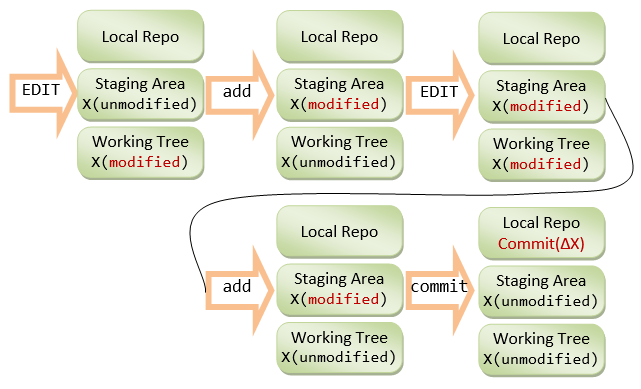
The four stages of a file in git
-
Create a Repository
Create a new local repository from scratch
123456git init [my_project]orcd my_projectgit initDownload from an existing repository
1git clone remote_reposity_url_on_github -
Check your repository
List the files that have not been committed
1git statusShow the changes to files not staged
1git diffShow full change history
1git logShow more detailed change history
1git reflogshow the changes between two commits ids
1git diff commit_id1 commit_id2 -
Git Branches
List all local branches
1git branchList all local and remote branches
1git branch -avcreate a new branch
1git branch my_branch_nameSwitch to a branch
1git checkout my_branch_namecreate a new branch using an old branch and switch to the new branch
1234567git checkout old_branch_namegit checkout -b new_branch_nameorgit checkout old_branch_namegit branch new_branch_namegit checkout new_branch_namedelete a local branch
1git branch -d branch_namedelete a remote branch
123git push origin :{the_remote_branch}orgit push origin --delete the_remote_branchtag a branch
1git tag my_tagmerge branch_a to branch_b
12git checkout branch_bgit merge branch_a -
Add files to repository and do commit
Add a single file to index, ready for commit
1git add file_nameAdd all the updated tracked files to index, ready for commit
1git add -uAdd all the files to index, ready for commit
1git add .Commit the staging files
1git commit -m "the message for this commit"Unstage files, keep the file changes
1git reset file_nameRevert everything to the last commit
1git reset --hard -
Word with remote repository
Upload your local branch to your remote branch
12git checkout branch_namegit push origin branch_nameGet all the remote forked branches to local
1git fetch originList the current configured remote repository for your fork.
1234git remote -vorigin https://github.com/YOUR_USERNAME/YOUR_FORK.git (fetch)origin https://github.com/YOUR_USERNAME/YOUR_FORK.git (push)Specify a new remote upstream repository that will be synced with the fork.git
1remote add upstream https://github.com/ORIGINAL_OWNER/ORIGINAL_REPOSITORY.gitVerify the new upstream repository you’ve specified for your fork.
123456git remote -vorigin https://github.com/YOUR_USERNAME/YOUR_FORK.git (fetch)origin https://github.com/YOUR_USERNAME/YOUR_FORK.git (push)upstream https://github.com/ORIGINAL_OWNER/ORIGINAL_REPOSITORY.git (fetch)upstream https://github.com/ORIGINAL_OWNER/ORIGINAL_REPOSITORY.git (push)Build a new branch using upstream master
12git fetch upstreamgit checkout upstream/master -b new_branch_nameRebase your local branch with the upstream master branch
123git fetch upstreamgit checkout your_branchgit rebase -i upstream/master -
Reference:
https://help.github.com/articles/configuring-a-remote-for-a-fork/
http://zeroturnaround.com/rebellabs/git-commands-and-best-practices-cheat-sheet/


